Web Boids
I ported my dissertation to multithreaded WASM, it's blazingly fast.
Rust
WebAssembly
Vite
CSS Modules
Preface
Rewriting my portfolio using vanilla HTML, CSS and JavaScript (more here) changed my approach to loading WebAssembly. I discuss this after
the original post below.
Summary
I implemented an optimised version of the Boids algorithm in Rust, improving performance with multithreading. This compiles to WebAssemblyWebAssembly is a modern web standard that runs binary code compiled from LLVM supported languages like C, C++, and Rust at near-native speed in the browser. and runs as machine code in the browser.
Purpose & Goal
I wasn't satisfied with the performance of the Boids implementation I did for my University dissertation. Because it was written in Python without algorithmic optimisations, it could only run up to 100 boids. I've also been interested in learning Rust, using ViteA frontend build tool and development server., and writing library code. My acceptance criteria were:
- Implement an optimised Boids algorithm
- Utilise Test Driven DevelopmentA methodology of writing code where you first write failing tests and then get them to pass.
- Support multithreading
- Measure performance
I started by reading The Rust Programming Language and completing ThePrimeagen's Algorithms Course
Spotlight
Boids is a swarming algorithm modelled on the natural flocking patterns of birds. Each member of the swarm follows their own rules based on their surroundings, producing emergent behaviour. The Boids algorithm can produce many patterns of behaviour: Birds (see the Basic preset on the simulation above), Fish (see the Maruyama preset), and UAVs (see the Zhang preset). The Boids rules are as follows:
- Attraction — move towards nearby swarm members
- Alignment — move with nearby swarm members
- Separation — avoid crashing into nearby swarm members
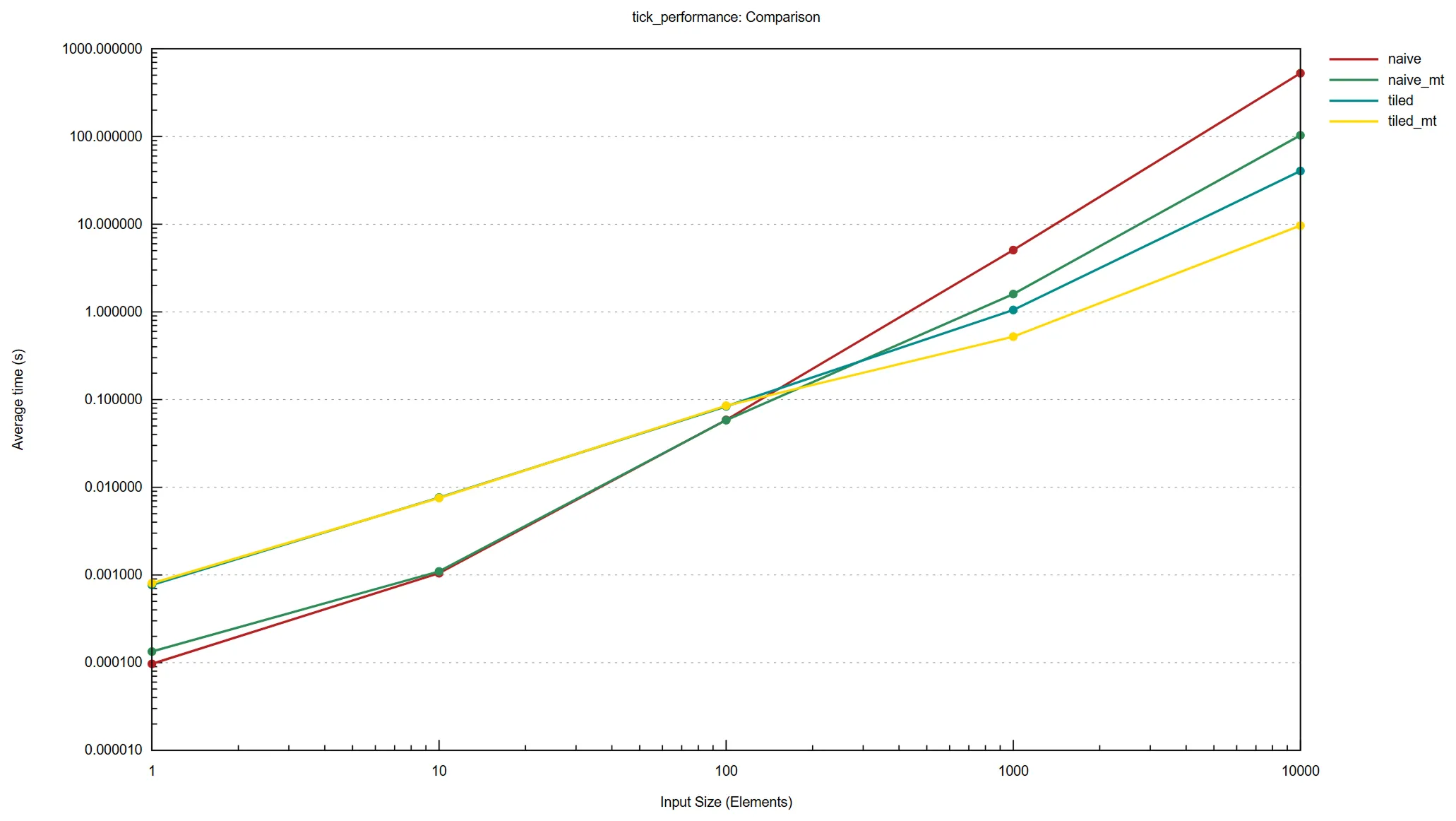
The most intensive computation in the Boids algorithm is in determining neighbours. The naive algorithm is O(N2)Big O notation tells us how much an algorithm slows down as its input size increases.: for each Nth swarm member we have to check our distance to all N other swarm members. The tiled algorithm improves on this by splitting the grid into tiles as large as the Boids can see, and only checking Boids within adjacent tiles. Our N Boids only have to check a fixed number of neighbours because each tile has a maximum capacity, determined by the swarms density. This means tiling reduces complexity to O(N).
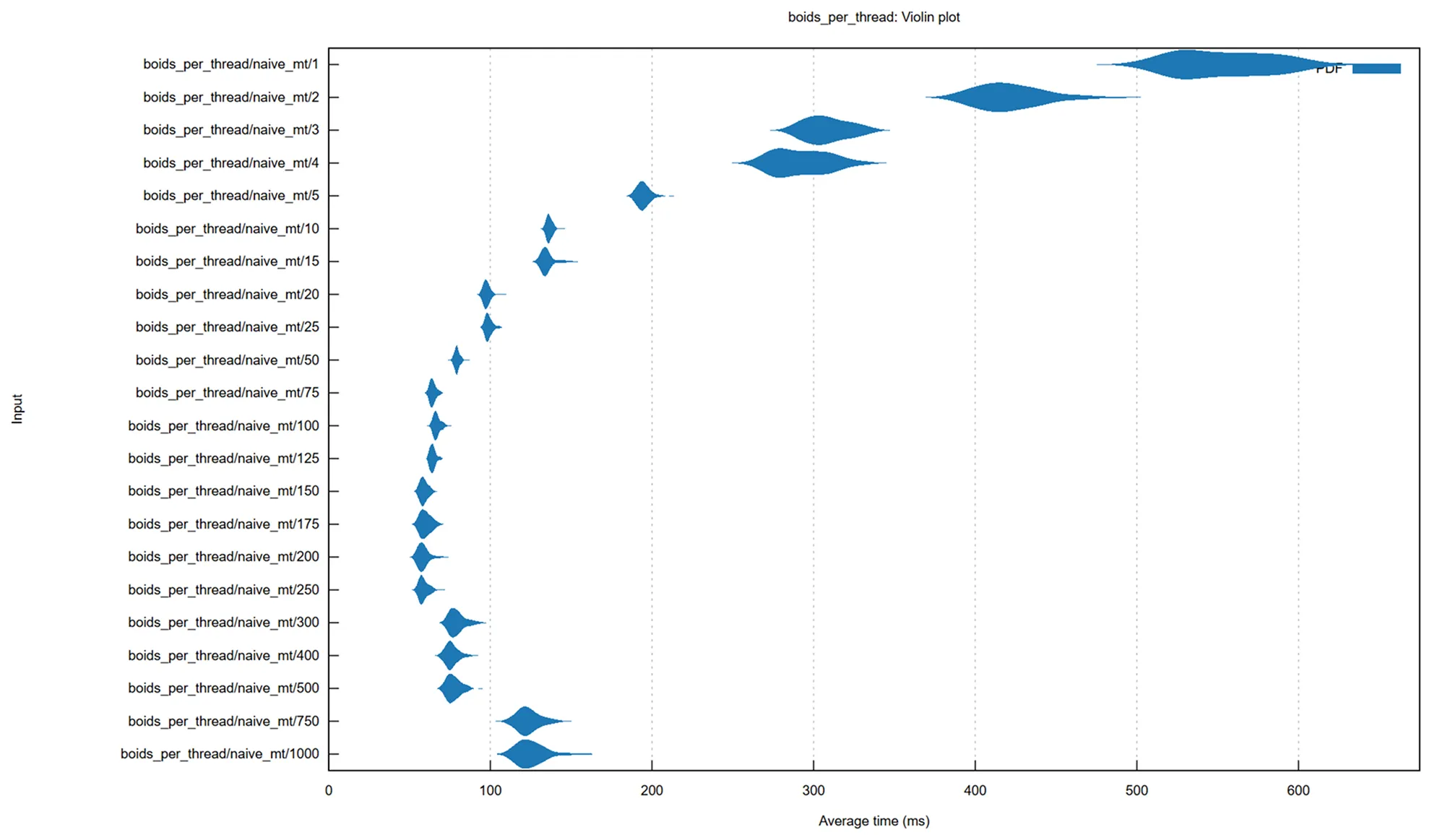
The naive and the tiled algorithms can be improved by adding a multithreading strategy. I use the rayon Rust crateA Rust package., which implements work stealing: each thread is given a queue of work, and once that queue is depleted, it will start to steal chunks of work from other threads. We can fine-tune this strategy by adjusting the minimum number of tasks per chunk. If the minimum is low, we will spend more time stealing work than doing work, if it is too high then threads will start to sit idle.
Challenges
WebAssembly is notorious challenging to set up, and I decided not only to try and use multithreaded WASMWebAssembly — requiring me to use a nightly build of Rust with specific feature flags to even compile my project — but also bundle it into a Vite library using RollupVite's build tool, then import it as an npmNode Package Manager. A public registry and command-line tool for publishing and installing JavaScript packages. package into a Next.jsA full-stack meta-framework built on top of React. project that uses WebpackA legacy JavaScript bundler., with next to no documentation to follow because nobody else is mad enough to try to import multithreaded WASM into a Next.js application.
I had a log of difficulty building my project into WebAssembly with threads. WASM doesn't natively support threads in the same way that operating systems do. Instead of CPU threads you use Service Workers spawned from JavaScript. This means you need to add a binding between Rust and JavaScript so that when you would usually create an operating system thread in Rust, you instead create a Service Worker in WebAssembly.
During development, every time I enabled WASM multithreading my simulation started to run more slowly. I knew from my Rust benchmarks that the multithreaded code was faster natively, so I thought there must be some extra overhead in copying data between Service Workers in WASM. I rearchitected my code to remove cloning of values but it was still slower. After confirming the code was running on different Service Workers I was at a loss. Later, when implementing the controls I found that when I increased the neighbour radii enough, multithreading actually was faster… I was just testing it on the wrong values.
I split my project into a WASM section, a Vite library, and a Next.js library consumer. I already had the link between the Vite library and Next.js working, so I thought that now I could just push the new package version to npm and watch the magic happen. I was very wrong. Somewhere between “Hello world” and “full multithreaded Boids implementation” something broke; I should have been checking the build pipeline as I made changes.
I eventually found the magical Webpack encantations necessary for the single-threaded code to load, but the multithreaded code was crashing on worker instantiation. Several days of debugging later I came to the conclusion that the issue was likely to do with how Webpack handles dynamic imports, and dozens of patch versions later, I felt I was reaching diminishing returns and decided to move on.
Lessons Learned
I learned that Test Driven Development is very effective when writing library code. Writing the tests first left me confident that my simulation was correct, and when I wrote the visualiser the simulation code worked first try. This is a stark constrast to my dissertation, where two months before submission I realised my simulation code has a massive bug in it: one of the Boids rules was being skipped over entirely due to a typo. The unoptimised algorithm meant that I didn't have enough time left to rerun the necessary simulations for my write-up, and I had to accept the failure. If I had used TDD, I would have caught this bug early.
Architecturally, I learned the cost of integrating different systems. Getting WebAssembly working in Rust isn't that difficult, writing a React library in Vite isn't that difficult, importing a React library into a Next.js project isn't that difficult. The astonishing difficulty comes from combining them, ending up with an enormous surface area for errors, many in external libraries.
In future projects, I will only adopt dependencies that reduce complexity. As programmers, our goal isn't to use the mightiest technologies, it's to deliver working software. If our mighty technologies prevent us from shipping code, they're worth nothing.
Postscript
During my portfolio rewrite, I was dreading the hours I expected it would take to get my simulation running in vanilla HTML and JavaScript. It turns out, WebAssembly isn't that complicated after all. I needed to import a file and… it… it's working?! Let me check multithreading… multithreading is ALSO working!? My poor past self, I'm never getting back those days spent trying and failing to do the equivalent of importing a file.
I added some enhancements to the simulation while I was at it: I pause and play the animation when it goes out of frame or switching tabs to reduce system load when not necessary, I rearranged the controls to make them more intuitive, I added a new Orbit preset which is ever so satisfying, and most importantly: I added a randomise button.